The Orbidder Vault is a storage system within Orbidder that can be used to keep all of your standard forms and attachments in a centralized location accessible to your organization’s Orbidder users.
The Vault can be accessed by selecting “Vault” on the main menu bar:

From the Vault screen, users can access to three locations using the left-side navigation panel:
- Global Vault
- Local Vault
- Snippet Library
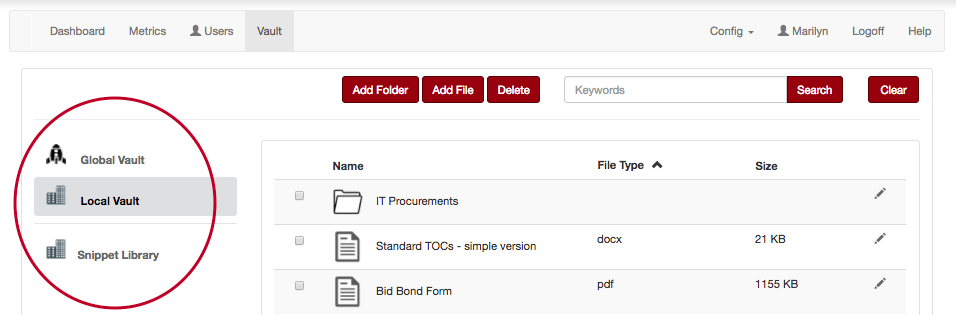
The Global Vault contains documents added by the Procurement Office for the use of all Orbidder users.
The Local Vault contains documents added by your organization for the use of your Orbidder users only. These documents cannot be seen by Orbidder users outside of your organization. Your local vault might include items like:
- Standard form contracts and terms and conditions
- Template evaluation grids
- Checklists or procedural guides
- Other forms or documents commonly used in your organization’s procurement processes
The Snippet Library contains snippets of content that can be dropped into Orbidder drafting fields from within your Orbidder projects. Please see Using the Snippet Library for more details.
Please note: Only the Head of Procurement, Procurement Lead or Client Administrator can add and delete documents within your Local Vault. If you would like to add a document to your Local Vault, contact your Head of Procurement or Procurement Lead.